Pocket Presentation Document Folder: A Modern Solution for Professional Organization
In today's fast-paced professional environment, the way we present information can be just as important as the content itself. The Pocket Presentation Document Folder offers a refined and functional approach to organizing materials, whether for a business meeting, client pitch, or internal review. This isn't just a folder—it's a carefully designed tool that supports branding, improves document handling, and enhances the overall presentation experience.
Understanding the Structure and Design
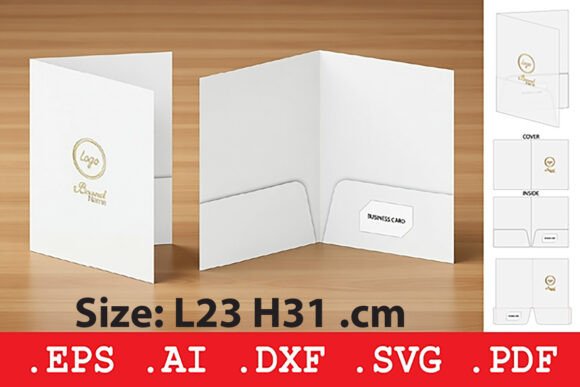
At its core, the Pocket Presentation Document Folder is engineered for practicality without compromising aesthetics. The design incorporates two internal pockets, allowing for the separation of different document types—such as contracts, brochures, and reference materials—while maintaining a clean and uncluttered appearance. Additionally, a dedicated business card slot ensures that contact information is always accessible and presented in a professional manner.
The folder is specifically crafted for use with 200–350 gsm cardstock, a weight range that balances durability with a premium feel. Unlike rigid folders that can feel bulky or overly formal, this non-rigid structure provides a lightweight alternative that's easy to carry and store. The fold lines are precisely engineered to ensure a snug fit for standard-sized documents, preventing slippage and maintaining a polished appearance.
File Formats and Customization Options
One of the standout features of the Pocket Presentation Document Folder is its versatility in digital design and production. The package includes a variety of file formats to suit different workflows and manufacturing needs:
- .DXF – Ideal for CNC and laser cutting applications, enabling precise physical production.
- .SVG – A scalable vector format compatible with digital design software and craft cutters.
- .EPS – A standard vector format preferred in industrial printing environments.
- .PDF – A print-ready layout for manual cutting or digital viewing.
- .AI – The original Adobe Illustrator file, allowing full customization of the design elements.
This variety ensures that users—whether they're in-house designers, print shops, or independent creators—can adapt the folder to their specific needs. The ability to modify colors, text, and layout elements makes it a powerful branding tool that aligns with company aesthetics and messaging.
Practical Use Cases Across Industries
The Pocket Presentation Document Folder is not limited to a single industry or application. Its utility spans across professions and sectors, making it a valuable asset for a wide range of users:
- Sales Professionals: Present proposals, contracts, and product literature in a cohesive and organized manner.
- Legal Practitioners: Carry case files, agreements, and supporting documents with a professional touch.
- Educators and Trainers: Distribute course materials, handouts, and certificates in a structured format.
- Event Planners: Organize itineraries, vendor contracts, and client briefings for on-site reference.
- Freelancers and Consultants: Deliver project summaries, invoices, and portfolios with a branded appearance.
Its adaptability makes it a go-to solution for anyone who regularly handles printed materials and wants to present them in a more intentional and visually appealing way.
Advantages Over Traditional Presentation Methods
Traditional folders and binders often lack the design sophistication and organizational clarity that modern professionals require. The Pocket Presentation Document Folder addresses these shortcomings by offering several distinct advantages:
- Streamlined Presentation: The two-pocket design allows for categorized content without overwhelming the recipient.
- Brand Consistency: Customizable templates ensure that every folder reflects the organization's visual identity.
- Portability: Its lightweight construction makes it easy to transport without sacrificing durability.
- Cost-Effective Production: Designed for compatibility with a range of cutting and printing technologies, it supports both small-scale and large-volume production.
- Professional First Impressions: The clean lines and thoughtful layout contribute to a polished and organized image.
These benefits combine to create a more efficient and visually appealing way to handle document presentations, especially in client-facing scenarios where attention to detail matters.
Designing for Impact: Tips and Considerations
While the Pocket Presentation Document Folder provides a solid foundation, the way it's customized can significantly influence its effectiveness. Here are some considerations for maximizing its potential:
- Color and Typography: Choose a color scheme that aligns with your brand guidelines. Avoid overly complex fonts that may be difficult to read at a glance.
- Visual Hierarchy: Use layout elements like borders, icons, and spacing to guide the viewer's attention toward key information such as your logo, tagline, or contact details.
- Material Choice: Since the template is designed for 200–350 gsm cardstock, consider the finish—matte, glossy, or textured—to enhance both the look and feel of the final product.
- Printing Techniques: Explore options like foil stamping, embossing, or spot UV to add a premium touch, especially for high-impact presentations.
- Testing and Iteration: Before mass production, create a sample print to evaluate how the folder functions in real-world conditions.
These small design decisions can make a big difference in how the folder is perceived and used, reinforcing professionalism and attention to detail.
Integrating the Folder into Your Workflow
For organizations looking to incorporate the Pocket Presentation Document Folder into their operational processes, integration is straightforward. Whether used in marketing, legal, or administrative departments, the folder can be part of a broader strategy to improve document handling and presentation standards.
For design teams, the availability of editable AI and SVG files means that the folder can be integrated into existing templates and branding kits. Print departments can leverage the DXF and EPS formats for seamless compatibility with cutting and printing equipment. And for end users, the folder simplifies the process of organizing and presenting materials, reducing the time spent on assembly and preparation.
This ease of integration makes it a scalable solution for businesses of all sizes, from startups looking to make a strong impression to large corporations seeking consistency in client-facing materials.
Final Thoughts on the Pocket Presentation Document Folder
The Pocket Presentation Document Folder is more than a container for papers—it's a strategic tool that enhances professionalism, supports branding, and streamlines document organization. Whether you're preparing for a client meeting, organizing training materials, or distributing event documentation, this folder offers a modern, functional solution that adapts to your needs.
With its thoughtful design, wide format compatibility, and real-world usability, it stands out as a versatile asset in any professional's toolkit. By investing in a well-designed presentation folder, you're not only organizing documents—you're elevating your brand and reinforcing your commitment to quality and attention to detail.