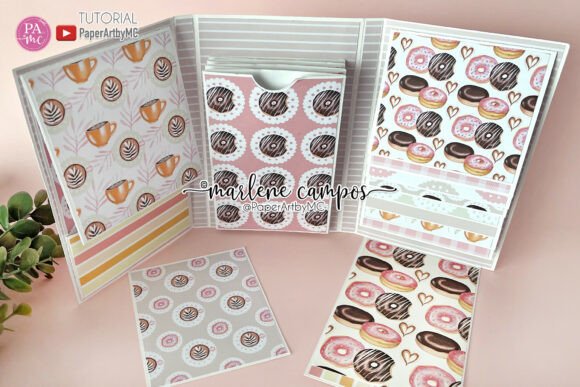
Interactive Skinny Scrapbook Album
Creative Memory Keeping Made Simple
The Interactive Skinny Scrapbook Album offers a fresh approach to scrapbooking, combining functionality with artistic expression. Designed as a layered cutting file, it’s ideal for crafting personalized albums that go beyond the traditional. Whether you're preserving travel memories, documenting a special event, or creating a heartfelt gift, this scrapbook format encourages interaction through its layered elements and expandable design.
What Makes It Unique?
Unlike standard photo albums, the Interactive Skinny Scrapbook Album is built with movement and engagement in mind. It features layered inserts, expandable pockets, and decorative elements that invite the viewer to explore. This isn’t just a place to store photos—it’s a storytelling tool that allows you to layer narratives, add journal entries, and incorporate small keepsakes directly into the design.
Perfect for Multiple Uses
- Memory keeping: Capture birthdays, holidays, or everyday moments with a dynamic layout.
- Gift giving: Handmade albums make thoughtful, personalized presents for weddings, anniversaries, or baby showers.
- Journaling: Combine writing and visuals for a more expressive diary or travel log.
- Mini albums: Use the design to create compact, themed collections—perfect for seasonal updates or small photo sets.
How to Use the Cutting Files
This project includes SVG, DXF, EPS, and PNG files, making it compatible with most popular cutting machines like Cricut and ScanNCut. You'll also receive a PDF tutorial and a link to a step-by://youtube.com/@yourchannel for visual guidance. The files are fully scalable, so you can adjust the size to fit your project needs without losing clarity.
Beginners can start with the provided templates and gradually add custom elements as they gain confidence. More experienced crafters can mix and match inserts, change paper styles, or incorporate additional embellishments to create a one-of-a-kind design.
Design Elements Included
- Cover patterns with decorative layers
- Multiple insert styles for photos and journaling
- Paper decorations for added dimension
- SVG and DXF files optimized for cutting machines
- Printable PNG shapes for digital use or print-and-cut projects
Adapting for Different Audiences
One of the strengths of the Interactive Skinny Scrapbook Album is its versatility. Here’s how different users can adapt it:
- Scrapbookers: Use it as a base for themed albums—like a vacation journal or baby’s first year.
- Entrepreneurs: Create sample portfolios or product lookbooks that unfold creatively.
- Bloggers: Design interactive printables or downloadable planners that engage your audience.
- Educators: Make interactive learning kits or student progress trackers.
- Marketers: Use the design for branded mini-albums in promotional kits or event recaps.
Styling Tips for a Cohesive Look
To keep your album visually consistent, consider the following:
- Stick to a unified color palette or theme (e.g., vintage, modern, seasonal).
- Mix textures and patterns but keep them within the same style family.
- Balance open space with detailed elements to avoid overcrowding.
- Use labels or tabs to guide the viewer through interactive sections.
Project Ideas to Inspire
Here are a few creative directions to explore with your Interactive Skinny Scrapbook Album:
- Travel Log: Include maps, tickets, and short journal entries with hidden flaps that reveal more details.
- Recipe Book: Layer recipe cards inside the album with pockets for handwritten notes or ingredient lists.
- Wedding Memories: Feature photos, quotes, and mementos from the big day in a soft, romantic layout.
- Mini Art Journal: Use the pages as a canvas for small mixed-media pieces or daily sketch prompts.
- Family History: Create a compact family tree with layered names, photos, and short bios.
Customizing for Digital or Physical Use
While the album is designed for physical crafting, the included PNG and SVG files allow for digital adaptations. You can:
- Create digital scrapbook templates for sale or personal use.
- Convert the design into printable planners or interactive PDFs.
- Upload the files to design platforms like Canva or Adobe Express for hybrid projects.
Keeping It Organized and Impactful
To ensure your finished album is both beautiful and functional, consider these practical tips:
- Plan your layout first: Sketch out your pages before cutting to avoid misplacing elements.
- Label interactive sections: Make it easy for others to explore your album by adding visual cues.
- Use quality materials: Choose acid-free paper and archival adhesives to preserve your work.
- Test the mechanics: Open and close each interactive piece to ensure smooth movement.
Why It Works for Creative Professionals
Whether you're a designer, educator, or small business owner, the Interactive Skinny Scrapbook Album offers a flexible format for presenting content in a tactile, memorable way. It’s ideal for:
- Client proposals with layered visuals and data highlights
- Teaching tools that combine visuals and interactive learning
- Brand storytelling through curated visual narratives
Its compact size (4x6.5 inches) makes it easy to mail, display, or carry—perfect for pop-up events, workshops, or portfolio reviews.
Final Thoughts
The Interactive Skinny Scrapbook Album is more than a craft project—it’s a creative system that invites personalization, storytelling, and interactivity. With its layered design, scalable files, and endless customization options, it supports a wide range of creative goals. Whether you're a beginner looking to explore new techniques or a professional seeking a unique presentation format, this scrapbook album offers a versatile and rewarding way to bring your ideas to life.